# Resources -Electronic Policies
# CDI Best Practices and Recommendations
### **CDI Defined**
Central Discovery Index (CDI) is a database of citations gathered from a wide array of sources such as journal articles, e-books, legal documents and more. They are harvested from thousands of primary and secondary commercial publishers and aggregators, and from open-access repositories. CDI is also a relational database between citations rather than just an aggregated list of abstracts or citations. This enables linking features like those between a book review and the book in question or a book chapter and the entire book. By default, CDI will try to display results for material where the full text is available for your users based on your local subscriptions or subscriptions provided to members of the consortium.
Source: Section titled “Central Discovery Index (CDI). [https://wiki.library.ucsf.edu/display/SILS/Primo+VE+Glossary](https://wiki.library.ucsf.edu/display/SILS/Primo+VE+Glossary)
**Required Role**: CDI Operator
### **Components of CDI:**
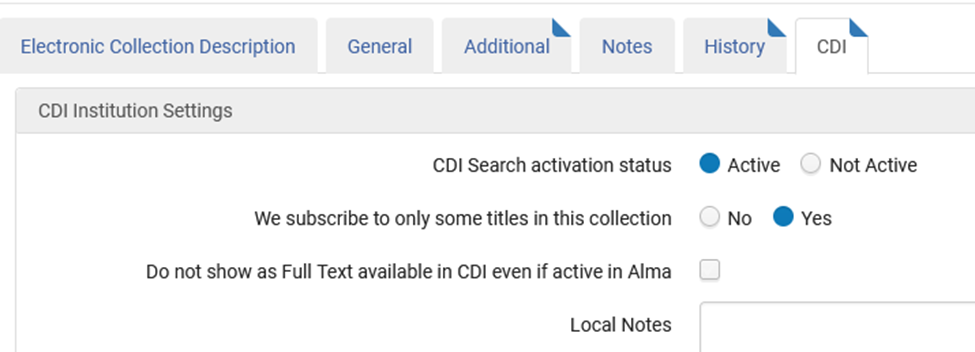
CDI Search activation status OR CDI Search activation status
● Active/Yes: If selected, the content will be searchable.
● Not Active/No: If selected but a collection has both active portfolios and inactive portfolios, only the active portfolios will show as View Online,
○ NOTE: Book Chapters (e.g., book chapters, encyclopedia entries, etc.,) from CDI will *not* show as View Online, even if the book is activated.
*Recommendation:* Select Active or Yes
We subscribe to only some titles in this collection
● Yes: CDI will try to match your active portfolios in Alma to records in CDI to show “View Online” on those.
● No: Everything from the collection (as identified in CDI) will show as Online.
*Recommendation*: Select as appropriate for your electronic collection.
Do not show as Full Text available in CDI even if active in Alma
● Checked: CDI content will *not* have a View Online link in Primo. Instead, it will show a “How to get it” link.
○ NOTE: This will affect book chapters in CDI as well.
*Recommendation:* Checkbox should be left unchecked
\*Recommendations provided by the libraries in WRLC
\*\*Source of information and definitions: Harvard Wiki: “[CDI Management in Alma and interoperability with Primo](https://wiki.harvard.edu/confluence/display/LibraryStaffDoc/CDI+management+in+Alma+and+interoperability+with+Primo)”, created by Corinna Baksik.
### **Additional aspects to consider:**
Duplicate results for e-books appearing in Primo (if using a blended search scope)
Scenario: Two results are being displayed in Primo for a single activation of a title.
Likely cause: A record from both Alma and CDI are being displayed.
● Mark the “do not show as full text” checkbox.
● Good practice to select “No” next to “CDI Search activation status”, so that unrequestable books do not appear in the results of an expanded search.
● CON: Book chapter-level results (dictionary entries, encyclopedia entries, etc.,) will no
● longer appear if “CDI Search activation status” is set to No.
**Additional information:**
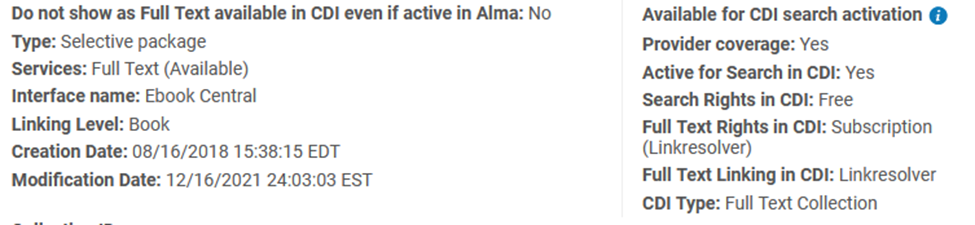
● Available for CDI search activation:
● Provider coverage:
● Search Rights in CDI:
● Full Text Rights in CDI:
● CDI Type:
Definitions for each section can be located [here](https://knowledge.exlibrisgroup.com/Alma/Product_Documentation/010Alma_Online_Help_(English)/Electronic_Resource_Management/030_Working_with_Local_Electronic_Resources/015Managing_Electronic_Resources#CDI_Activation).
### **Linking Methods**
Primo supports the following linking methods, which are set at the collection level:
● OpenURL linking
● Link in Record
● Primo Link Template CDI collections
Source: [CDI and Linking to Electronic Full Text document](https://knowledge.exlibrisgroup.com/Primo/Content_Corner/Central_Discovery_Index/Documentation_and_Training/Documentation_and_Training_(English)/CDI_-_The_Central_Discovery_Index/050CDI_and_Linking_to_Electronic_Full_Text) by ExLibris
### **Additional sources:**
Single Activation with the Fully Flexible Setting (Ex Libris documentation: [https://knowledge.exlibrisgroup.com/Alma/Product\_Documentation/010Alma\_Online\_Help\_(English)/Electronic\_Resource\_Management/060\_Alma\_Single\_Activation\_Source\_for\_CDI/020Single\_Activation\_with\_the\_Fully\_Flexible\_Setting](https://knowledge.exlibrisgroup.com/Alma/Product_Documentation/010Alma_Online_Help_(English)/Electronic_Resource_Management/060_Alma_Single_Activation_Source_for_CDI/020Single_Activation_with_the_Fully_Flexible_Setting)
CDI and Linking to Electronic Full Text:
[https://knowledge.exlibrisgroup.com/Primo/Content\_Corner/Central\_Discovery\_Index/Documentation\_and\_Training/Documentation\_and\_Training\_(English)/CDI\_-\_The\_Central\_Discovery\_Index/050CDI\_and\_Linking\_to\_Electronic\_Full\_Text](https://knowledge.exlibrisgroup.com/Primo/Content_Corner/Central_Discovery_Index/Documentation_and_Training/Documentation_and_Training_(English)/CDI_-_The_Central_Discovery_Index/050CDI_and_Linking_to_Electronic_Full_Text)
Primo VE Release Notes page (Will include CDI updates): [https://knowledge.exlibrisgroup.com/Primo/Release\_Notes/002Primo\_VE](https://knowledge.exlibrisgroup.com/Primo/Release_Notes/002Primo_VE)
Single Activation for CDI in Alma - Overview:
[https://knowledge.exlibrisgroup.com/Alma/Product\_Documentation/010Alma\_Online\_Help\_(English)/Electronic\_Resource\_Management/060\_Alma\_Single\_Activation\_Source\_for\_CDI/010Single\_Activation\_for\_CDI\_in\_Alma\_-\_Overview](https://knowledge.exlibrisgroup.com/Alma/Product_Documentation/010Alma_Online_Help_(English)/Electronic_Resource_Management/060_Alma_Single_Activation_Source_for_CDI/010Single_Activation_for_CDI_in_Alma_-_Overview)
Using the Central Discovery Index (CDI) in Alma:
[https://knowledge.exlibrisgroup.com/Alma/Product\_Documentation/010Alma\_Online\_Help\_(English)/Electronic\_Resource\_Management/060\_Alma\_Single\_Activation\_Source\_for\_CDI/060Using\_the\_Central\_Discovery\_Index\_(CDI)\_in\_Alma](https://knowledge.exlibrisgroup.com/Alma/Product_Documentation/010Alma_Online_Help_(English)/Electronic_Resource_Management/060_Alma_Single_Activation_Source_for_CDI/060Using_the_Central_Discovery_Index_(CDI)_in_Alma)
Specialized Search Scopes for CDI (released March 2022):
[https://knowledge.exlibrisgroup.com/Primo/Release\_Notes/002Primo\_VE/2022/010Primo\_VE\_2022\_Release\_Notes?mon=202201BASE#CDI-Related\_Updates](https://knowledge.exlibrisgroup.com/Primo/Release_Notes/002Primo_VE/2022/010Primo_VE_2022_Release_Notes?mon=202201BASE#CDI-Related_Updates)
# Placement of Electronic Resources in Alma
### Introduction
This policy establishes guidelines on where bibliographic records for electronic resources should be placed within the Ex Libris Alma architecture. This policy applies to all staff members of Washington Research Library Consortium (WRLC) institutions who work in Alma.
---
### Background
When WRLC migrated to Alma in July 2018, most electronic resource records from Voyager and Sierra were placed in the Network Zone (NZ), which is the shared catalog. This immediately caused a problem because member institutions do not have access to electronic resources held by other member institutions. The only electronic resources that can be accessed by all libraries are those which were acquired as a consortium; these are managed by WRLC in the NZ. All other institution-specific electronic resources are not shared and therefore do not belong in the shared catalog. Furthermore, the presence of other institutions’ electronic resources confused patrons, who were frustrated or confused by not being able to access some ejournals, ebooks, and other electronic resources. At that time, it was not possible to limit the display of electronic resources in Primo VE by owning institution. Therefore, all institutions unlinked their records from the NZ so that they only resided in the proper Institution Zone (IZ).
During migration, electronic resources from Serials Solutions were activated in the Community Zone (CZ), which is a knowledge base of shared records for electronic resources that can be used by all Alma customers. Staff have also been activating electronic resources in the CZ since migration completed. These CZ records also go to the NZ, even though they are for non-shared electronic resources. It is not feasible for staff to unlink these records from the NZ (as they did with other migrated records) because that also breaks the link to the CZ.
---
### Policy
1. All bibliographic records for shared electronic resources acquired by WRLC must reside in the NZ.
2. All bibliographic records for non-shared electronic resources acquired by individual institutions:
1. Must reside in the IZ if that institution loads the records from a vendor, OCLC, or any source other than the CZ.
2. May reside in the NZ if that institution has activated them in the CZ.
1. These records may not be edited, merged, or overlaid in the NZ; instead, all changes must be made in the CZ.
2. If an institution finds the CZ records to be low quality or inaccurate, the institution may create its own record in its IZ.
3. Consistent with this policy, individual institutions may link from a shared electronic resource in the NZ to a “local discovery collection”***\**** in order to highlight or promote specific electronic titles.
1\. Linking an NZ-level bibliographic record to a local discovery collection does not create a portfolio in the IZ or a corresponding holdings record for the institution in the NZ.
2\. The Alma IZ link icon (house symbol) will now display for the linked bibliographic record in the NZ, indicating that the NZ-level bib and portfolio are linked to one or more local discovery collections.***\*\****
3\. Deleting a shared electronic resource from a local discovery collection will only remove the link within that local discovery collection.
4\. It is the responsibility of the individual institution to maintain the accuracy of their local discovery collections. Institutions should bear in mind that the availability of specific titles within WRLC shared collections is subject to change without notice.
\* In an attempt to more clearly identify these collections, we have adopted the term “local discovery collection”. ExL uses the terms collection or sometimes "local collection”, to distinguish these from "electronic collections" in Alma. These local collections, which may include a combination of digital, print, and electronic titles, are managed in Alma at the IZ level, (see Resources >> Manage Inventory >> Manage Collections) and displayed in Primo VE through the collections menu item, or can be linked via a collection-specific URL.
In addition, ExL uses the term "discovery collection" for a facet that breaks down CDI analytics in Primo VE by CZ electronic collection. As such, please note that this facet does not function to identify these “local discovery collections”, rather it seems to apply only to CDI entries in a blended search profile (one that includes articles).
\*\*The NZ-level bibliographic and portfolio information for individual titles in WRLC-provided shared collections selected by an institution are indexed directly into that institution's discovery layer. In this case, the IZ selections are attached to the collection-level record in the NZ (showing as "available for"), rather than to individual titles. As such, the house symbol does not show up next to the title in the NZ unless the title is also linked from the IZ with local holdings (against this policy) or, now, as part of a “local discovery collection” (in compliance with this policy).
[See Managing Collections documentation.](https://knowledge.exlibrisgroup.com/Alma/Product_Documentation/010Alma_Online_Help_(English)/040Resource_Management/050Inventory/050Managing_Collections)
[See Adding NZ titles to a local collection in the Alma May 2025 highlights.](https://www.youtube.com/watch?v=644y6JIKYVQ)
---
### Approval
Approved by Electronic Resource Committee on 8/27/20.
Approved by Metadata Committee on 8/28/20.
# URLs in Alma Bibliographic Records
### Introduction
This policy establishes guidelines on the inclusion of institution-specific uniform resource locators (URLs) in bibliographic records for electronic resources within the Ex Libris Alma architecture. This policy applies to all staff members of Washington Research Library Consortium (WRLC) institutions who work in Alma.
### Background
The MARC 856 subfield $u is the standard location in the bibliographic record for URLs. These URLs may provide direct access to an electronic resource or they may link to ancillary documentation, such as summary, table of contents, etc. Access URLs may be generic, or may be specific to a particular institution. Institution-specific access URLs are problematic.
Records containing institution-specific access URLs in the 856 $u field may be introduced to the shared catalog via migration or from other sources, including Community Zone records created or edited by vendors and by other Alma libraries, or from services such as OCLC. When these records are introduced to a different local catalog, the access URLs are not functional, creating confusion for users.
Ex Libris is working to address this problem on a global level. Individual libraries can fix their own records and try to avoid further problems. The Alma local equivalent for the 856 field is 957, which is not transferred to shared records. Institution-specific URLs in the 957 field are not problematic. Transferring the URL from the 856 to the 957 field resolves the problem.
### Policy
1. Institution-specific access URLs are not to be stored in the MARC 856 $u, but instead should be stored in the 957 $u or 856 $x.
2. Generic URLs (of any type: access or table of contents, etc.) that apply to all institutions are allowed in 856 $u.
### Approval
Approved by Electronic Resource Committee on 1/28/21.
Approved by Metadata Committee on 1/29/21.
# Open Access Community Zone Collections in the NZ
A number of Open Access (OA) Community Zone (CZ) collections are activated and managed in the WRLC Network Zone (NZ).
The decision to manage the most popular OA CZ collections in the NZ was agreed upon by the E-Resources Committee, the Coordinated Collections Committee, and the Alma/Primo Advisory Committee in the 2021-2022 school year. This was done to ease the burden of maintenance for the individual schools. Like all e-collections in the Network Zone, access to the collection is distributed to members who want the collection to appear in their institution's Primo VE.
For a current list of OA CZ collections , please see the [Shared Electronic Collections page](https://alma.wrlc.org/books/resources-electronic/page/shared-electronic-collections) (the value in the *Access Type* column equals *Open Access*).
Collections that are activated by 5 or more institution and that have an overall Brief Level over 6 are reviewed and added to the NZ once a year. For a full workflow on how new collections are approved, please see the [Shared Open Access E-Resource Collections Workflow page](https://alma.wrlc.org/books/resources-electronic/page/shared-open-access-e-resource-collections-workflow).